
When I ask candidates, “How would you scale this service?”, one of the most common answers I hear is: “I would use autoscaling.”
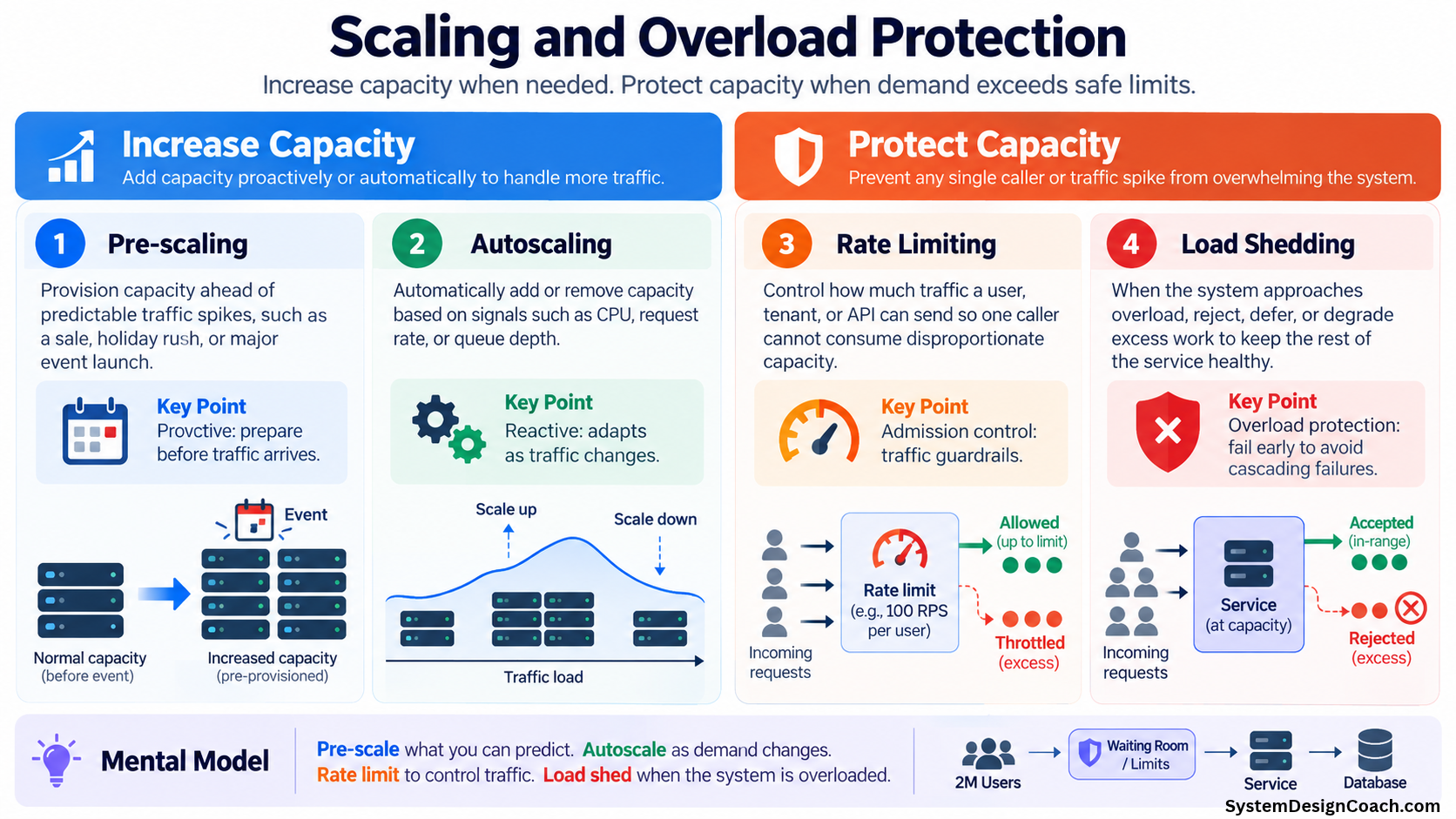
That is a good answer, but it is incomplete. Autoscaling is an important tool for building scalable systems, but handling traffic growth involves more than just automatically adding servers. I find it useful to think about the problem in two distinct parts:
1. Increase Capacity (Process more traffic)
- Pre-scaling
- Autoscaling
2. Protect Capacity (Prevent excess traffic from overwhelming the system)
- Rate limiting
- Load shedding
Understanding this distinction is critical both when designing production systems and during system design interviews.
Part 1: Increasing Capacity
1. Pre-scaling: Prepare for the traffic you know is coming
Suppose your service normally runs on 20 instances. However, you know that every Christmas, traffic increases significantly. Or perhaps you operate a ticketing platform, and tickets for the World Cup will go on sale tomorrow at exactly 9:00 AM.
You should not wait until 9:00 AM for your autoscaling system to notice the increased traffic. Instead, you can pre-scale the service by increasing capacity before the expected traffic arrives:
- Normal traffic: 20 instances
- Before the event: Scale up to 60 instances
- After the event: Scale down to normal capacity
Cloud platforms provide mechanisms such as scheduled scaling and predictive scaling for exactly this kind of workload.
Why not simply rely on autoscaling?
Because autoscaling is fundamentally reactive. Consider the multi-step process that must occur before additional capacity can actually handle requests:
- Traffic increases.
- A metric (CPU utilization, request rate, queue depth) crosses a threshold.
- The scaling system detects the change and triggers an alarm.
- New instances or containers are provisioned and started.
- The application initializes and runs startup scripts.
- Instances become healthy and register with the load balancer.
- They finally begin serving traffic.
Depending on the platform and application, this process takes time. For a gradually increasing workload, that delay is perfectly acceptable. But for a sudden traffic spike at a known time, traffic will arrive faster than new capacity becomes available. If you already know that traffic is coming, there is no reason to wait for your system to discover it. Pre-scaling is proactive.
2. Autoscaling: React as demand changes
Of course, we cannot predict everything. Perhaps you expected traffic to double, but it triples. Maybe your normal traffic fluctuates throughout the day, or a feature unexpectedly goes viral. This is where autoscaling shines.
Suppose you want to keep your average CPU utilization around 60%. Here is how autoscaling responds as demand changes:
- Baseline: You are running 20 instances at 60% CPU.
- Traffic increases: CPU hits 80%.
- Autoscaling triggers: The policy detects the utilization spike and adds 10 new instances.
- Resolution: As those new instances start serving traffic, the load is distributed, and average utilization normalizes back toward your 60% target.
Autoscaling allows the system to continuously adapt to changes in demand without requiring manual intervention. Crucially, pre-scaling and autoscaling are not competing strategies. For a major event, you can pre-scale to give yourself an initial safety margin, while keeping autoscaling enabled to adjust if reality differs from your forecast.
Part 2: Protecting Capacity
Scaling the application service is not enough. Imagine you successfully autoscale your service from 20 to 100 instances, but every one of those instances calls the same database. If the database can safely handle only 10,000 requests per second, adding more application servers simply allows you to overwhelm the database faster.
When thinking about scaling, you must consider the entire request path:
`Client → API Gateway → Service → Cache → Database / Downstream Services`
Your system is ultimately constrained by its bottleneck. Adding compute capacity at one layer does not automatically increase the capacity of its downstream dependencies. Sometimes, the correct response to additional traffic is not to add more capacity—it is to stop accepting some of the traffic.
3. Rate limiting: Control how much traffic you admit
Rate limiting puts strict boundaries around how much traffic a client, tenant, or API is allowed to generate. For example:
- User A: Maximum 10 requests/second
- Tenant B: Maximum 1,000 requests/second
- Expensive API Endpoint: Maximum 20,000 requests/second
This serves several purposes. It prevents one noisy neighbor from consuming a disproportionate amount of shared capacity, protects against buggy clients stuck in retry loops, and mitigates abusive traffic. Most importantly, it puts guardrails around the total amount of work entering the system.
Notice that a perfectly healthy service may enforce rate limits all the time. Rate limiting is an admission policy, not an indicator of system overload.
4. Load shedding: Protect the system during overload
Even with perfect capacity planning, pre-scaling, autoscaling, and rate limits, unexpected overload happens. Suppose your system can safely process 10,000 requests per second. Suddenly, a dependency degrades, or a database node fails, temporarily reducing your effective capacity to 6,000 requests per second. Meanwhile, 15,000 requests per second are arriving.
If you blindly accept all 15,000 requests, you will create large request queues, exhaust connection pools, spike memory consumption, and trigger widespread timeouts. This results in clients retrying, generating even more traffic, and turning a temporary bottleneck into a cascading failure. Instead of serving 6,000 customers successfully, the system collapses and serves almost nobody.
A resilient system knows approximately how much work it can safely process and deliberately rejects or degrades excess work once it approaches that limit. This is load shedding.
Load shedding does not always mean returning an error.
Rejecting a request is the simplest approach, but a system under duress has other options to reduce the strain on constrained resources:
- Reject low-priority requests while allowing critical ones.
- Pause asynchronous background processing.
- Stop expensive, optional operations (like generating recommendations).
- Return cached or slightly stale data.
- Serve a simplified, degraded response.
A useful rule of thumb here is to fail cheaply and early. If you already know the database cannot process a request, rejecting it at the API gateway is much cheaper than allowing it to travel through several microservices, consume threads, and wait for a database timeout before ultimately failing anyway.
Extreme Traffic Spikes and Admission Control
For some systems, simply rejecting excess users provides a terrible customer experience. Consider a ticketing platform dropping a massive concert release.
If 2 million users arrive for a reservation system that can safely process 10,000 requests per second, autoscaling the web tier won't fix the transactional database bottleneck. Instead, you introduce admission control—like a virtual waiting room. The waiting room queues the 2 million users and drips them into the reservation service at the exact rate the database can handle. The broader principle remains the same: never allow more work into a constrained system than it can safely handle.
Putting It All Together: The Interview Takeaway
A robust traffic-management strategy requires a simple mental model:
- Pre-scale what you can predict.
- Autoscale as demand changes.
- Rate limit to control traffic policies.
- Load shed to survive system overload.
The next time an interviewer asks, “How would you scale this service?”, do not stop at load balancers and autoscaling. Think through the problem systematically:
- Is some of the traffic predictable? If yes, consider pre-scaling.
- Can traffic change dynamically? Use autoscaling based on an appropriate signal (CPU, queue depth).
- Who should be allowed to consume capacity? Apply rate limits at the user, tenant, or API level.
- What happens when demand exceeds safe capacity? Define an explicit load-shedding or graceful-degradation strategy.
- What is the actual bottleneck? Remember that scaling the application tier is useless if the database cannot scale with it.
That final question is often the most important. Scaling a system is not simply about adding more machines. It is about understanding your bottlenecks, increasing capacity when appropriate, controlling how that capacity is consumed, and protecting the system when demand exceeds its limits.
In a resilient system, you do not just increase capacity. You ruthlessly protect it.