
In Part 1, we explored the core building blocks for keeping your search index in sync with your database using Change Data Capture (CDC): baseline architecture, consistency mechanisms, and resilience patterns.
This article continues with three additional critical topics:
- Reconciliation: Implementing automated drift detection and repair to maintain data correctness over time.
- Bootstrapping: How to bootstrap your search index with existing data without impacting the live traffic.
- Managed CDC Pipelines: When to build custom pipelines versus using AWS Zero-ETL.
1. Reconciliation and Drift Repair
Even with a robust CDC pipeline, data drift can occur. A consumer might be down longer than the stream's retention period (e.g., 24 hours for DynamoDB) or a logic bug might silently swallow specific update types.
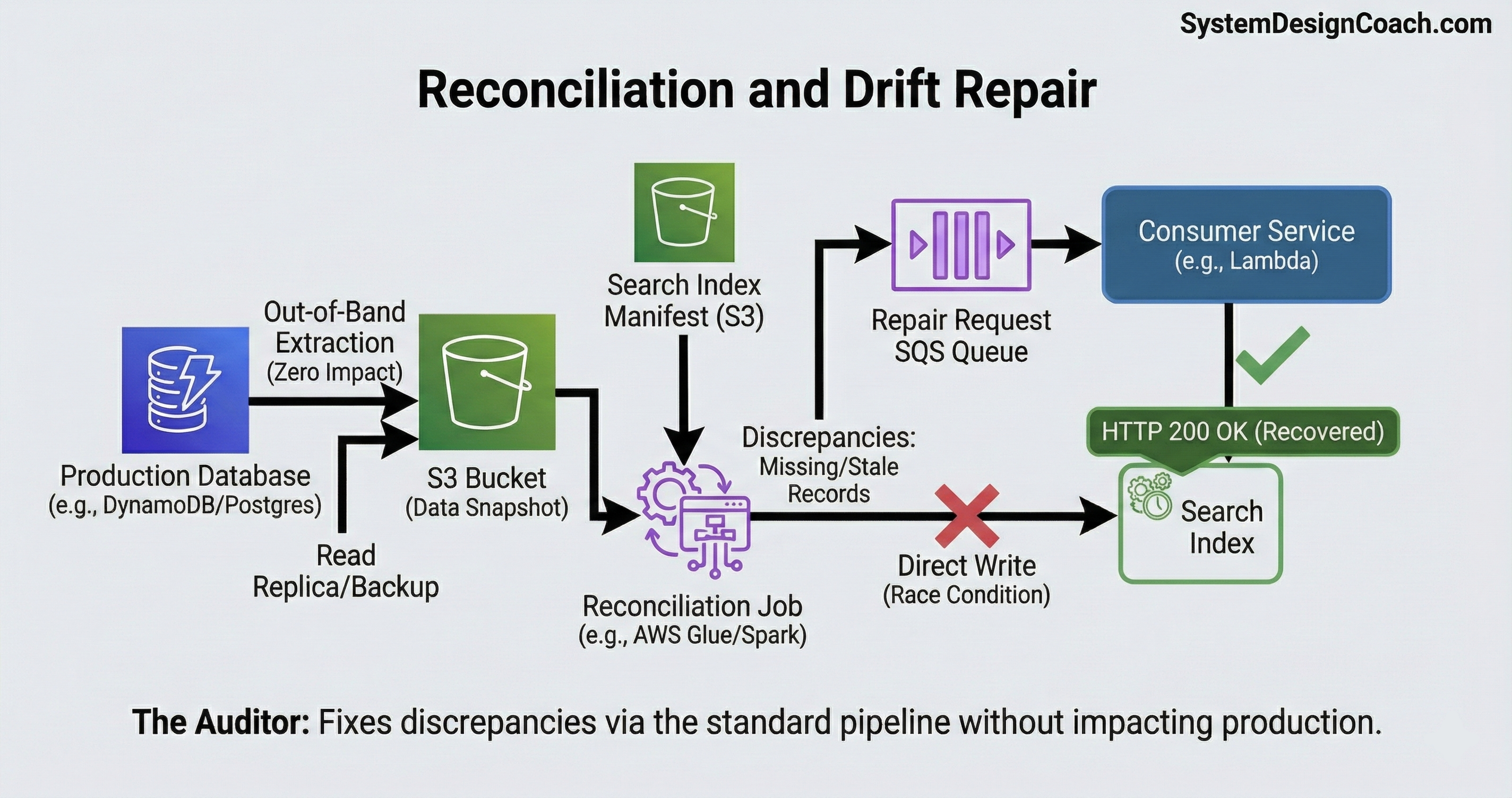
Over time, these small gaps accumulate, eroding trust in your search results. To fix this, you need a reconciliation job, a background auditor that detects and repairs inconsistencies without impacting production traffic.
The naive approach is to scan your production database and compare it to the search index. However, this approach is problematic: scanning a live production database consumes vital I/O and CPU, potentially degrading performance for your users.
To ensure zero impact on live traffic, use an out-of-band strategy that extracts data without touching your production database, compares it offline, and repairs inconsistencies through your existing CDC pipeline.
Extract Data Without Impact: Extract your database data using methods that bypass the active query engine, ensuring zero consumption of production resources:
- DynamoDB: Use the native Export to S3 feature. This dumps your table data to S3 without consuming your table's Read Capacity Units (RCUs), ensuring zero impact on live traffic.
- PostgreSQL: Run your extraction against a Read Replica or use a nightly backup snapshot. This isolates the reconciliation workload from your primary database.
Compare Offline: Once the data is stored in S3 (or a data warehouse), run a batch job (e.g., AWS Glue or Spark) to compare the database snapshot against an out-of-band manifest in S3 that reflects the current document IDs and versions stored in the search index, avoiding any scans of the live search cluster. This comparison surfaces two types of discrepancies:
- Missing Records: IDs that exist in the database but not in the search index.
- Version Mismatches: Records where the sequence_number or last_updated timestamp in the database is newer than what is in the search index.
Repair through the Indexing Pipeline: When the job finds a discrepancy, emit a reindex request for that ID and let it flow through the same indexing pipeline rather than writing directly to the search index. Writing directly creates a "race condition" risk where the batch job might accidentally overwrite a newer live update. It also forces you to maintain duplicate transformation logic in two places (the batch job and the stream consumer).
- If the drift was caused by a logic bug, fix the bug in your consumer code first, deploy the update, and then let the reconciliation job inject the events. The new code will process them correctly.
- This forces the repair through the standard pipeline, ensuring that all concurrency checks, versioning logic, and transformations are applied consistently, preventing the "split-brain" logic problems that plague dual-write systems.
In short, think of CDC as your Real-time Engine and Reconciliation as your Auditor. The engine keeps you fast; the auditor keeps you honest. You need both to sleep well at night.
2. Bootstrapping the Search Engine: The Initial Backfill
So far, we’ve focused on keeping a search index in sync with ongoing writes. But there’s a practical first problem to solve: how do you populate the index with the initial dataset, often hundreds of millions of records, without taking down your production database?
Running a SELECT * against a live production database is not an option. It will saturate I/O, consume critical capacity, and very likely cause an outage.
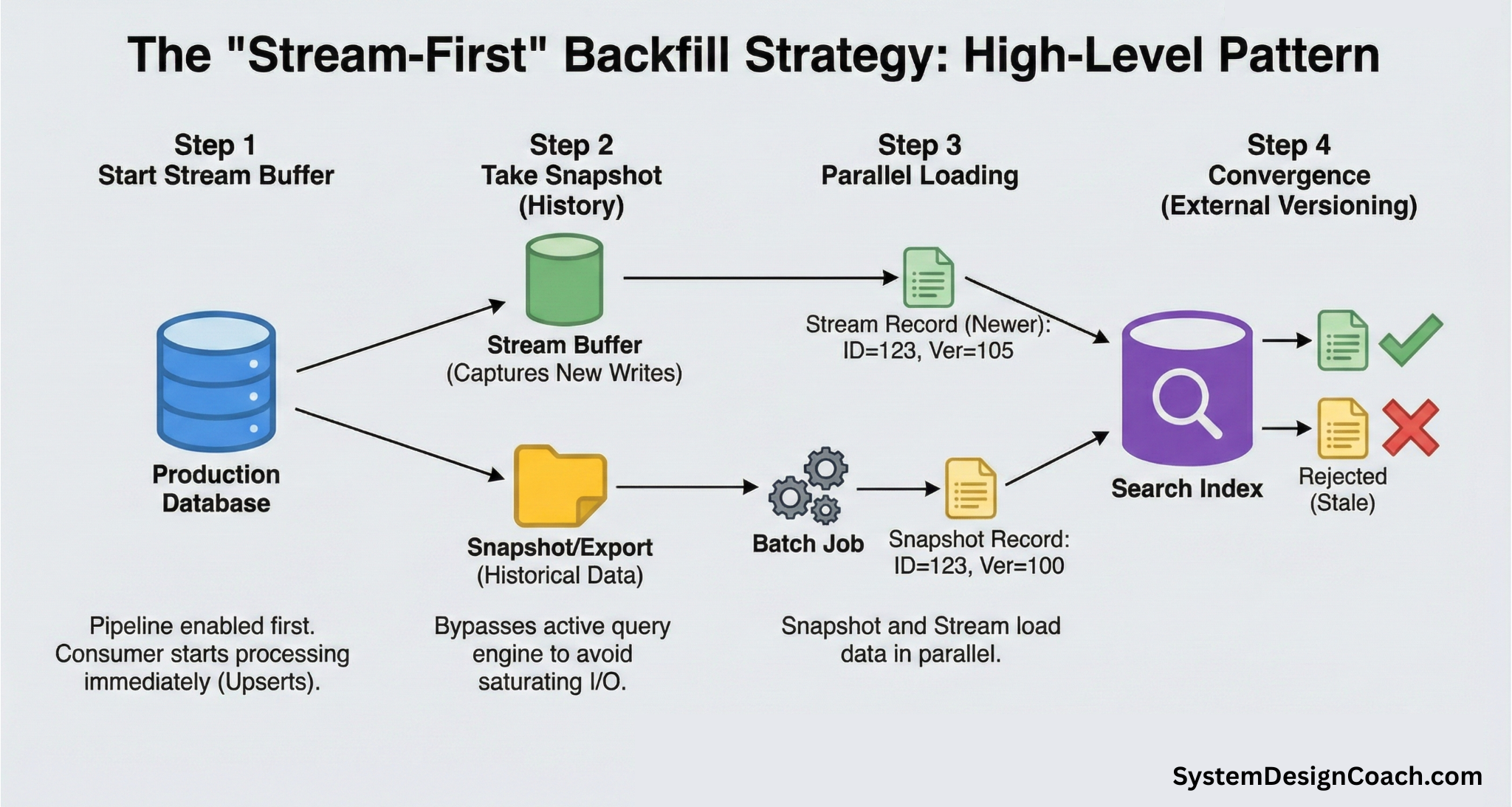
The key idea is to decouple historical data loading (the backfill) from real-time updates (the stream). While the backfill is running, new writes will continue to arrive. The stream acts as a buffer that captures those changes safely until the index fully converges.
The backfill strategy follows the same high-level pattern across different types of databases:
- Start the stream first: Enable CDC Pipeline and start the consumer before copying any historical data. This guarantees no writes are missed.
- Take a Snapshot of your data: Export historical data using a method that bypasses the active query engine.
- Load the snapshot into the search index: Bulk ingest the snapshot data into the search index in parallel.
- Let versioning handle convergence: External versioning ensures that newer stream updates always win over older snapshot data—without coordination or locking.
Have the stream consumer use upserts (doc_as_upsert: true). This makes it safe for stream updates to arrive before the snapshot. If the document doesn't exist yet, it will simply be created with the latest version.
Initial Backfill with DynamoDB
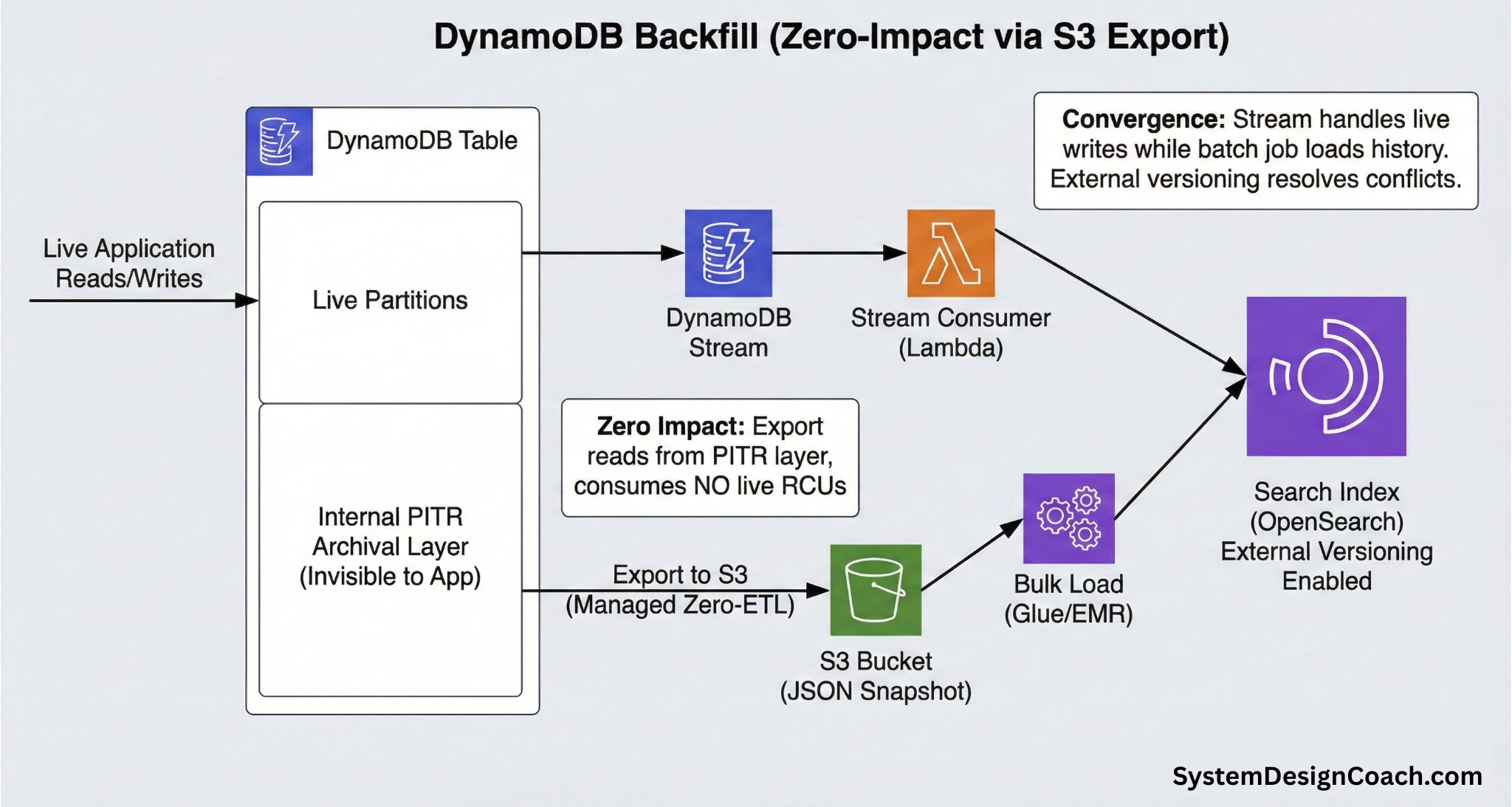
DynamoDB provides a purpose-built mechanism for this: Export to S3.
You first enable Point-in-Time Recovery (PITR) on your table. Once enabled, DynamoDB continuously archives table changes to an internal storage layer. When you trigger an export, DynamoDB spins up a dedicated fleet of workers to read from the archival layer, not from live partitions.
This guarantees zero consumption of Read Capacity Units (RCUs), zero impact on production latency, and predictable performance regardless of table size.
A typical backfill workflow for DynamoDB looks like this:
- Enable DynamoDB streams: Start capturing new writes immediately.
- Trigger export to S3: Export the full table snapshot as JSON files.
- Bulk load into the search index: Use AWS Glue, EMR, or a similar batch job to bulk-index the snapshot into OpenSearch using external versioning.
- Automatic catch-up: Since the stream is already running with upserts enabled, it will automatically handle any changes that occurred during the export process.
Initial Backfill with PostgreSQL
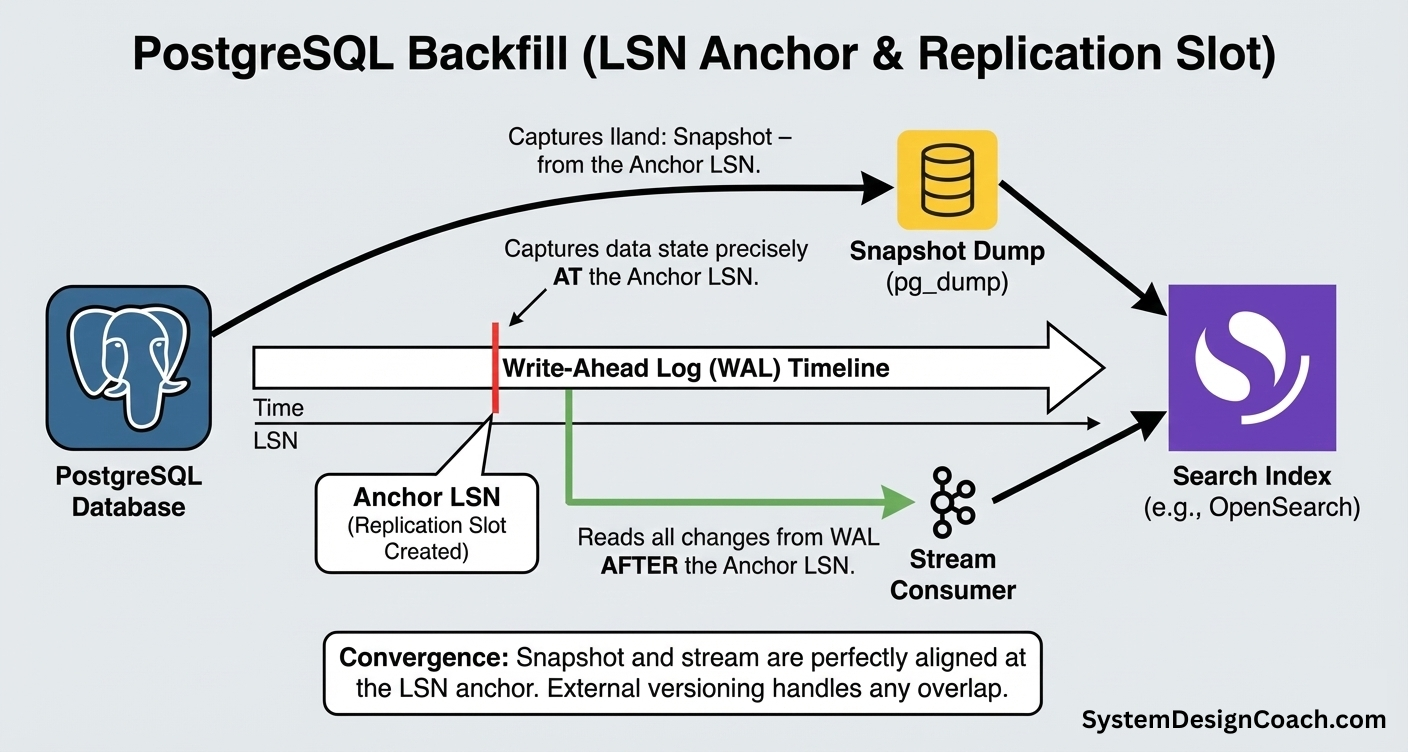
In Postgres, the Log Sequence Number (LSN) is your anchor. It represents an exact position in the Write-Ahead Log (WAL) and defines a precise point in time. A proper backfill strategy aligns your snapshot and your stream to this exact LSN to ensure zero data loss.
A typical flow looks like this:
- Create the anchor (replication slot): Run SELECT pg_create_logical_replication_slot(...). This tells Postgres to retain all WAL changes from that moment onward.
- Start the stream consumer: Point your stream consumer at the replication slot. It begins applying updates (as upserts) to the search index immediately.
- Take the snapshot: Dump the historical data using pg_dump or a backup snapshot.
- Load the snapshot: Bulk-index the snapshot into the search index.
If the snapshot contains stale data (e.g., version 100) that overlaps with a newer stream update (version 101), external versioning ensures the stale write is rejected automatically. The result is a clean convergence without coordination, locking, or race conditions.
Automated Backfilling
Many modern tools automate this pattern end-to-end:
- DynamoDB: The managed Zero-ETL integration (discussed in the next section) automates both the initial backfill and ongoing replication. It performs an initial backfill using Export to S3 without consuming table throughput and then automatically switches to DynamoDB Streams for continuous replication.
- PostgreSQL: Debezium can also automate the initial backfill and ongoing replication. It establishes a replication slot, publishes the initial backfill as READ events into Kafka, and then transitions to streaming WAL changes, with downstream consumers indexing both snapshot and live updates.
3. Managed CDC Pipelines
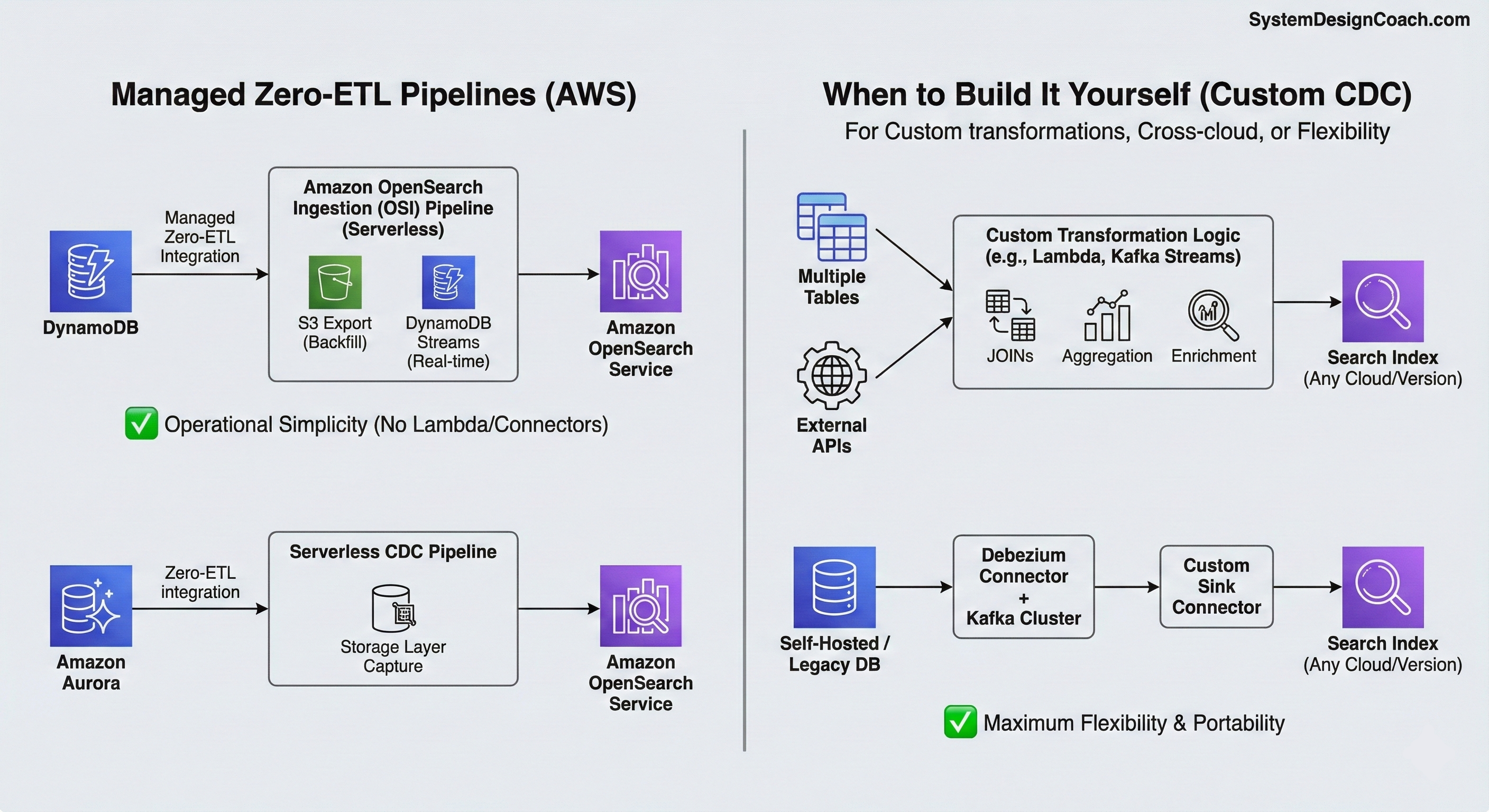
If you are running on AWS, you may not need to build and operate CDC pipelines yourself. AWS is moving toward a "Zero-ETL" vision where the complex plumbing of CDC is handled as a managed service.
These managed integrations prioritize operational simplicity over flexibility and are best suited for straightforward 1:1 replication into a search index.
Managed Zero-ETL for DynamoDB
For DynamoDB, you can enable the Zero-ETL integration with Amazon OpenSearch Service directly from the DynamoDB console.
Under the hood, AWS provisions an Amazon OpenSearch Ingestion (OSI) pipeline. It performs an initial full backfill using DynamoDB Export to S3 and then switches to DynamoDB Streams to replicate ongoing changes in near real time.
No custom Lambda functions or stream consumers are required.
Managed Zero-ETL for Amazon Aurora
For Amazon Aurora (PostgreSQL or MySQL), AWS offers a similar Zero-ETL integration with Amazon OpenSearch Service.
Instead of managing Debezium connectors or Kafka clusters, you create a "Zero-ETL integration" directly in the RDS console. AWS runs a serverless CDC pipeline that captures changes from Aurora’s storage layer and replicates them to OpenSearch, handling both the initial snapshot and continuous replication automatically.ch domain. It handles the initial snapshot and continuous replication automatically.
When should you still build it yourself?
Managed pipelines optimize for simplicity, not expressiveness. You should consider custom solutions when:
- Custom transformations: You need to "join" data from multiple tables, aggregate metrics, or call an external API to enrich your document before indexing.
- Cross-cloud and version independence: Managed integrations often tightly couple specific database versions to specific OpenSearch versions. If you need to write to a self-hosted Elasticsearch cluster, an older legacy version, or a cluster in a different cloud provider, the flexible Debezium/Kafka pattern is still the standard.
In those cases, the Debezium + Kafka or DynamoDB Streams + Lambda patterns remain the most flexible and portable options.
Summary
We've covered three critical topics that complete the picture for production-ready CDC-based search synchronization:
- Reconciliation: Implementing automated drift detection and repair using an out-of-band strategy that exports data, compares offline, and heals via the stream.
- Bootstrapping: Using the "Snapshot + Catchup" strategy to populate your search index with existing data without impacting production traffic.
- Managed Solutions: AWS Zero-ETL integrations provide operational simplicity for straightforward use cases, while custom solutions offer flexibility for complex transformations and cross-cloud deployments.
Whether you build it with a custom Lambda, a Kafka backbone, or an AWS Zero-ETL pipeline, the fundamental principle remains the same: decouple your search from your transactions, and use the database change log as your source of truth. Combined with the architecture, consistency, and resilience patterns covered in Part 1, these strategies form a complete production-ready system. The result is a search experience that is fast for your users, a database that remains stable under load, and a system architecture that is consistent by design.